You have 4 interviews booked for Thursday. But only 3 people show up. The fourth one isn’t necessarily rude. Maybe she accepted another offer, meant to email you, and it slid off the list. Or she joined the call at 2pm her time, which was 2pm in a different country. Or the invite went into a calendar she stopped checking 3 weeks ago. An interview reminder prevents some of that.
TL;DR: Here's how to send interview reminders in bulk:
- Keep your interview schedule in a sheet – one row per candidate, with date, time and time zone in separate columns
- Filter to tomorrow's interviews – reminders are time-relative, so you send a small batch daily rather than one big campaign
- Merge and preview – check the time zone column before anything goes out
- Leave tracking on – an unopened reminder is a signal to pick up the phone
- Ask for a one-word reply – confirmation is the part that actually reduces no-shows
Here’s what we’ll cover:
- Why Candidates Miss Interviews
- When to Send an Interview Reminder Email
- What to Include in an Interview Reminder Email
- How to Send Interview Reminders in Bulk from Google Sheets
- Interview Reminder Email Templates
- Common Mistakes to Avoid When Sending Interview Reminders
- What to Do When a Candidate Doesn’t Show Up
Sounds good? Then let’s dive in.
Why Candidates Miss Interviews
Candidates miss interviews for a handful of predictable reasons — most of them fixable with a reminder, some of them not.
A reminder fixes these:
- They forgot — the interview was booked 8 days ago and nothing has happened since.
- They got the time wrong — usually a time zone, occasionally a date.
- They lost the details — the meeting link is buried in a thread from last week.
- They couldn’t find you — wrong entrance, wrong floor, no idea who to ask for at reception.
A reminder doesn’t fix these:
- They accepted another offer — though a reminder often surfaces this a day early, which is worth something. You get the slot back instead of losing the hour.
- They lost interest — usually because the process went quiet for weeks. That’s a pipeline problem, not a reminder problem.
- They were never that engaged — a common issue with high-volume roles and one-click applications.
When to Send an Interview Reminder Email
Send interview reminders 24 hours before the interview. That’s the sweet spot. It’s early enough that the candidate can prepare or tell you they can’t make it, late enough that it’s still fresh in their mind.
Two adjustments worth making:
- For interviews before 10am — send the reminder the previous afternoon rather than the previous evening. An email arriving at 9pm is more likely to be missed than one arriving at 4pm.
- For anything more than a week out — send two reminders. One when the interview is booked, and one the day before. The gap between scheduling and interviewing is where engagement leaks.
What to Include in an Interview Reminder Email
Your interview reminder email should include everything the candidate needs to show up, and nothing else. Keep it short. The reminder is a logistics document, not a second sales pitch for the role.
Here’s what it should include:
- Date and start time — with the time zone spelled out
- Expected duration — so they can block the right amount of time
- Format — video call, phone, or on-site
- The meeting link, or the address — with the entrance and floor
- Who they’re meeting — with names and job titles
- Anything to prepare or bring — ID, portfolio, a completed exercise
- A reply path — a real address and a request to confirm Pair the email with a calendar invite if you haven’t sent one already. It survives an inbox in a way a message doesn’t, and it backs up whatever the reminder says.
How to Send Interview Reminders in Bulk from Google Sheets
To send interview reminders in bulk, filter your candidate sheet to tomorrow’s interviews and run a small mail merge each morning. Because unlike a rejection email, which goes to 90 people at the same moment, a reminder has to reach each candidate 24 hours before their interview. And everyone’s slot is different. That’s 5 minutes a day rather than one big send, and the volume is low enough that daily sending limits are a non-issue. Here’s the workflow ⤵️
1. Build Your Interview Schedule Sheet
Create a new Google Sheet. Add one row per interview, with the logistics split into separate columns so they can be merged individually.
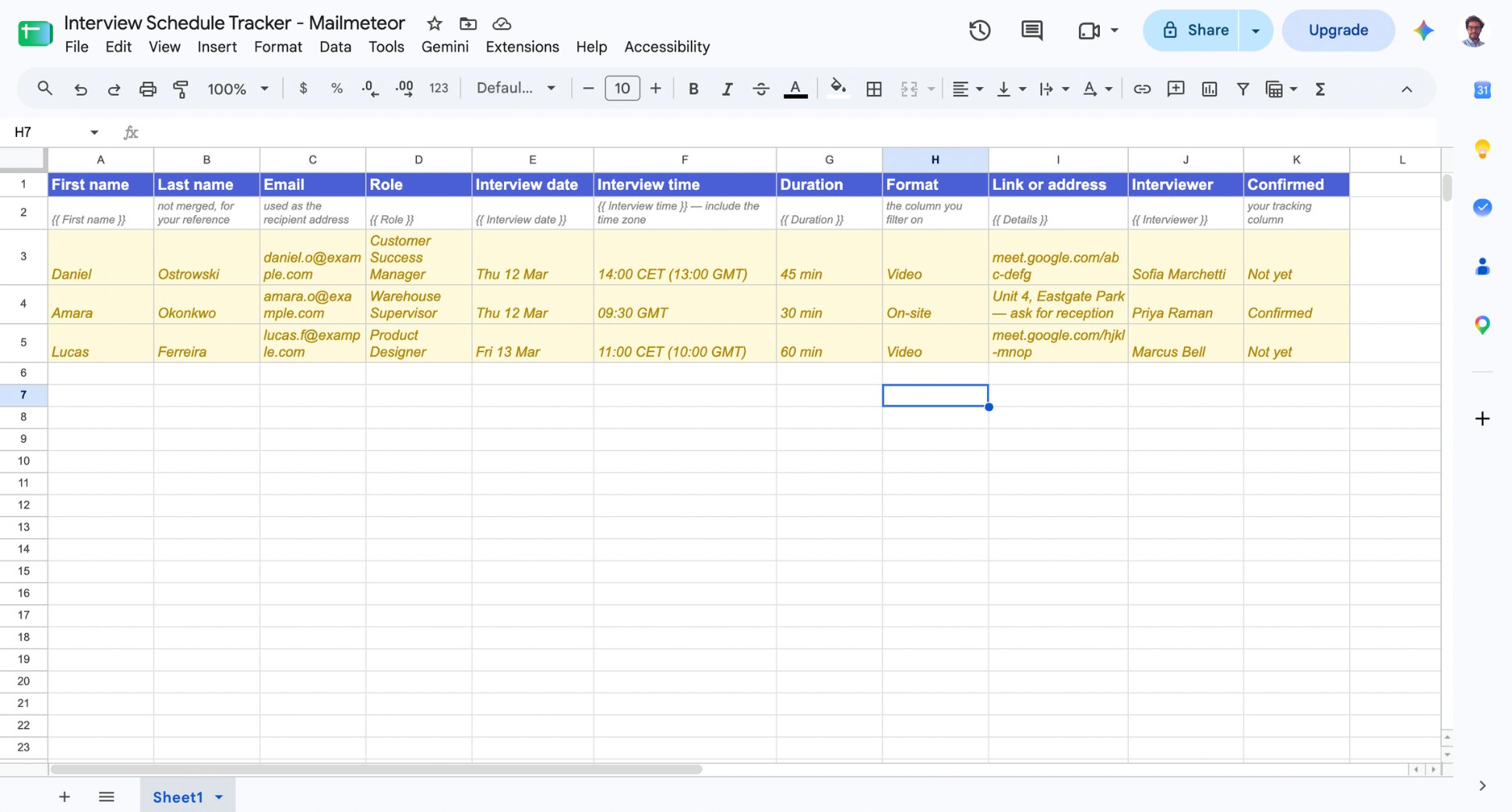
| Spreadsheet column | Merge tag | Example |
|---|---|---|
| First name | {{ First name }} |
Daniel |
| — | used as the recipient address | |
| Role | `` | Customer Success Manager |
| Interview date | {{ Interview date }} |
Thursday 12 March |
| Interview time | {{ Interview time }} |
14:00 CET (13:00 GMT) |
| Duration | `` | 45 minutes |
| Format | — | filters which template they get |
| Link or address | `` | meet.google.com/abc-defg |
| Interviewer | `` | Sofia Marchetti, Head of CS |
| Confirmed | — | your yes/no column |
Two columns deserve attention. Format never actually appears in the email, it decides which template the candidate gets. And Interview time should contain the time zone as text, written out, not implied by your spreadsheet’s locale.
2. Install Mailmeteor for Google Sheets
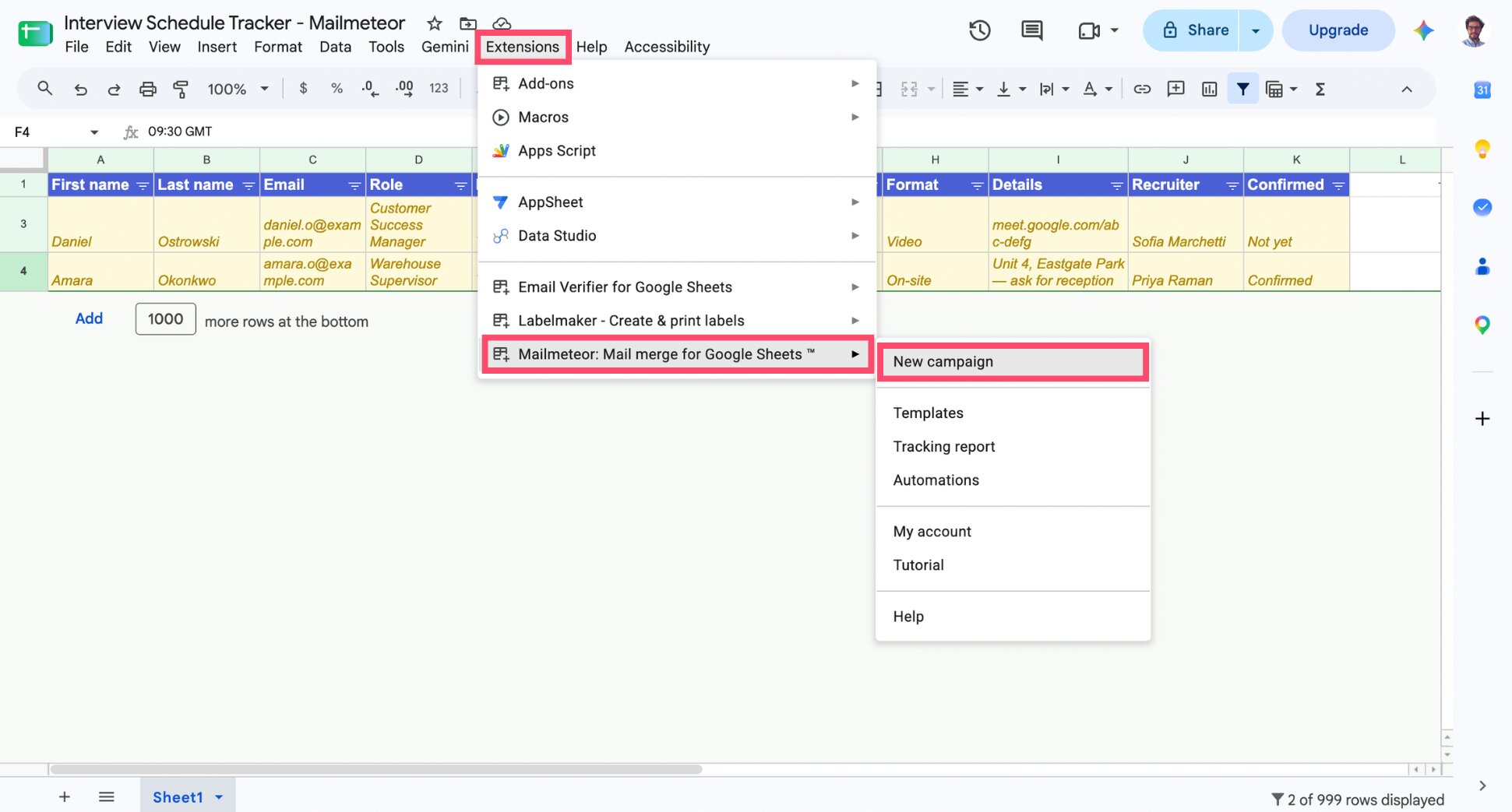
If you haven’t already, install Mailmeteor from the Google Workspace Marketplace. Then open your sheet, and go to Extensions > Mailmeteor > New campaign.
3. Write Your Reminder Templates
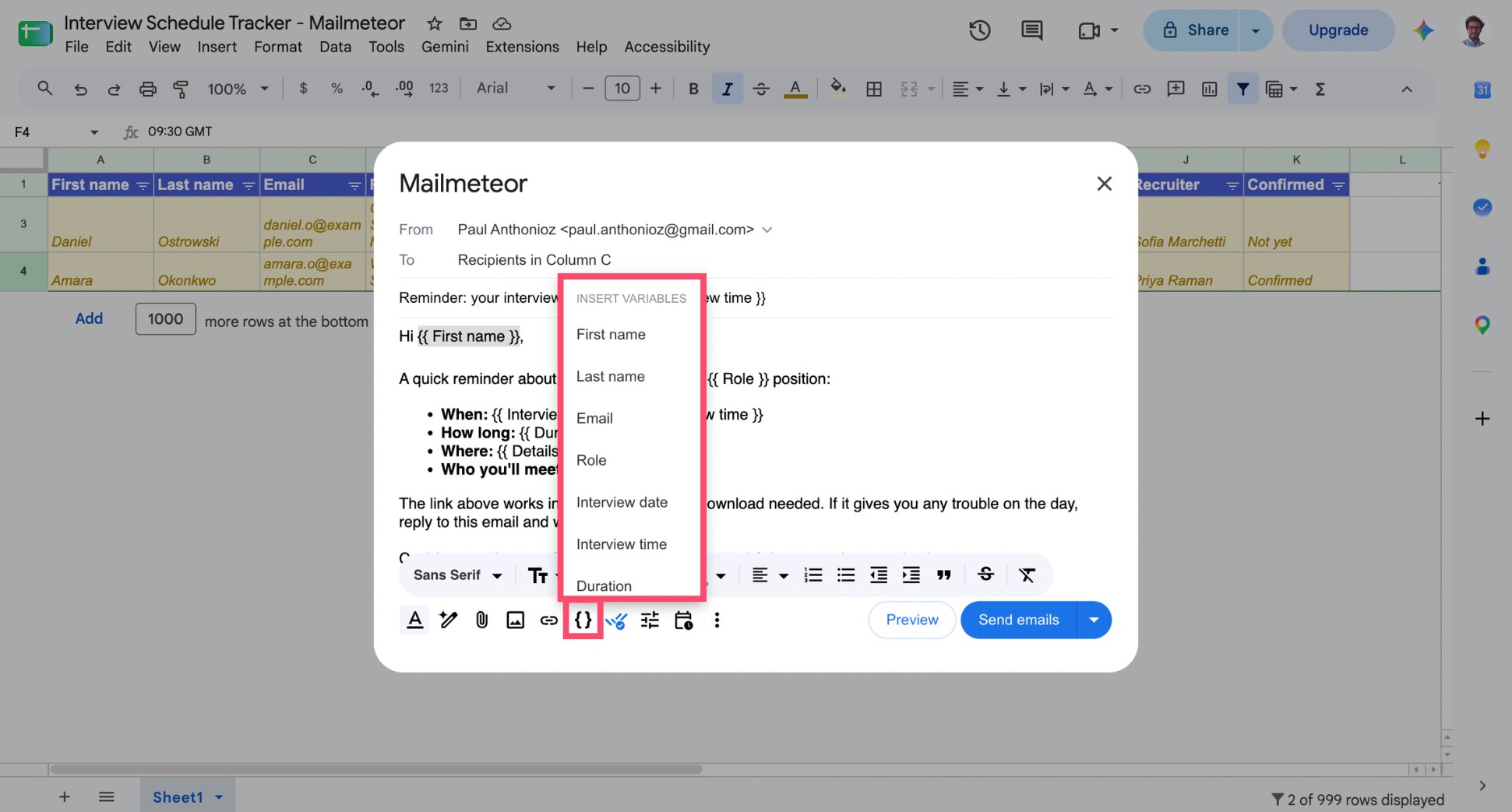
Write your first interview reminder. You’ll need 3 versions: video, on-site, and a short same-day version for early or unconfirmed slots. You can use Mailmeteor’s AI to generate a draft in one-click. Alternatively, you’ll find templates in the next section.
Place your cursor anywhere the copy should change per candidate, click Insert variable, and pick the matching column. Mailmeteor drops in a merge tag like {{ First name }} and when you send, it swaps that tag for the real value in each row.
4. Save Your Reminders as Reusable Templates
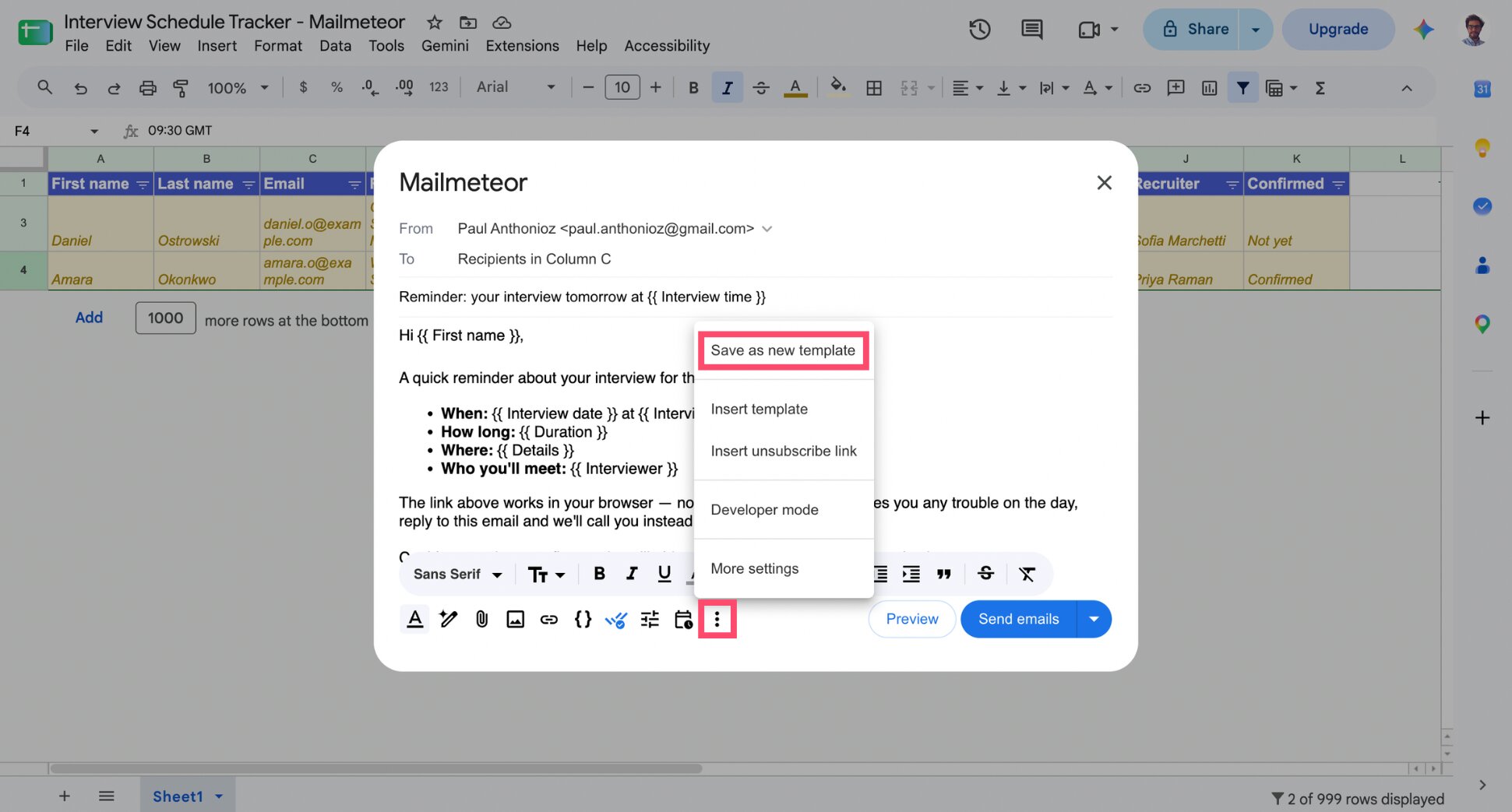
Once a reminder is ready, go to More options > Save as new template, name it, and click Save. Repeat for the other two formats. These run every week or so. So five minutes spent here saves five minutes every morning after.
5. Filter to Tomorrow’s Interviews
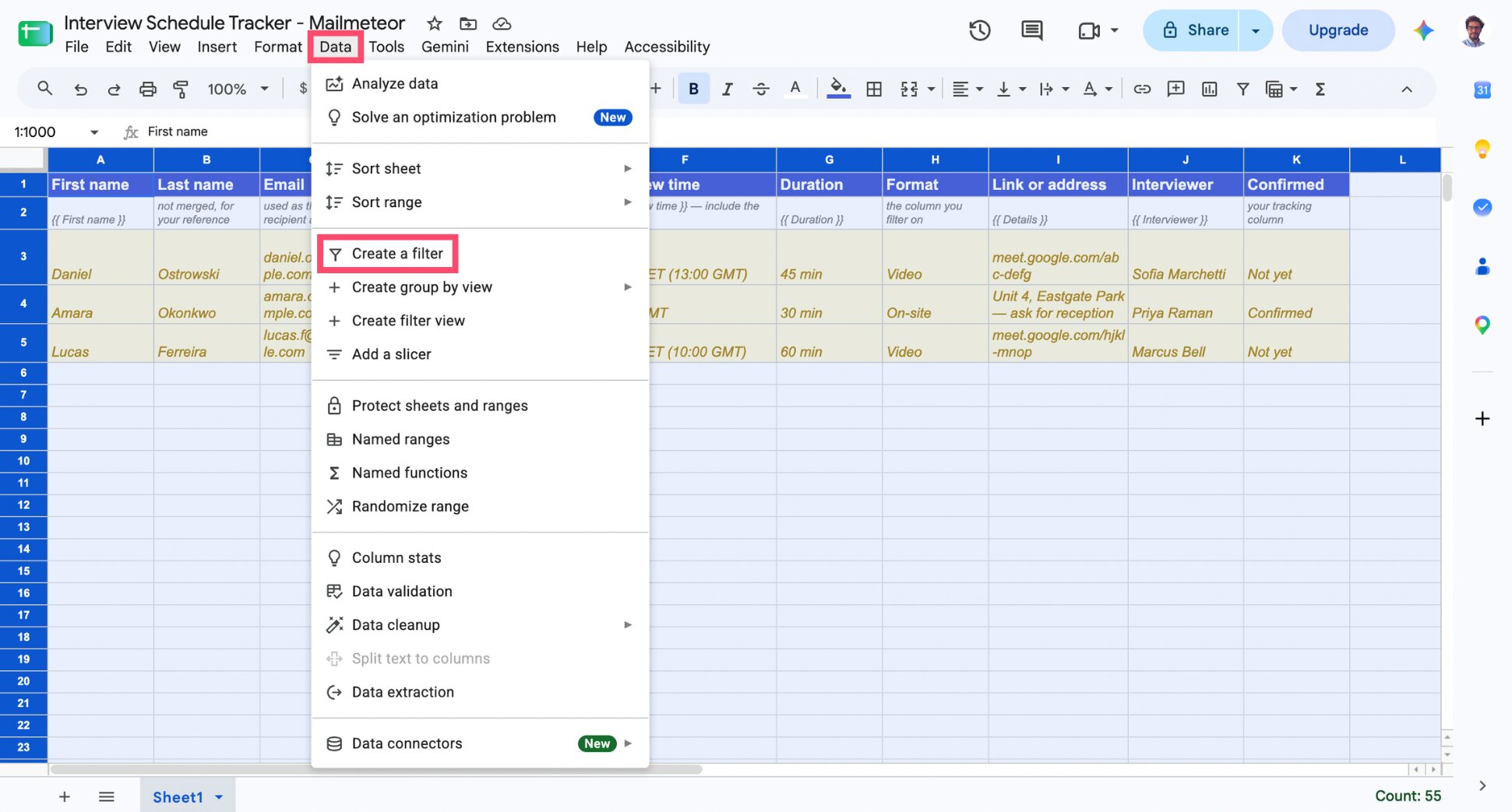
Apply a Google Sheets filter (Data > Create a filter) so only tomorrow’s rows are visible, then filter again by format. Mailmeteor sends to visible rows only, so each template reaches only the candidates it was written for. On a normal day that’s 2 or 3 emails, which feels almost too small to bother merging — until you’re doing it for 11 interviews across 4 formats during a hiring push.
6. Preview and Check the Time Zones
Back in Mailmeteor, click Preview and click through several rows.
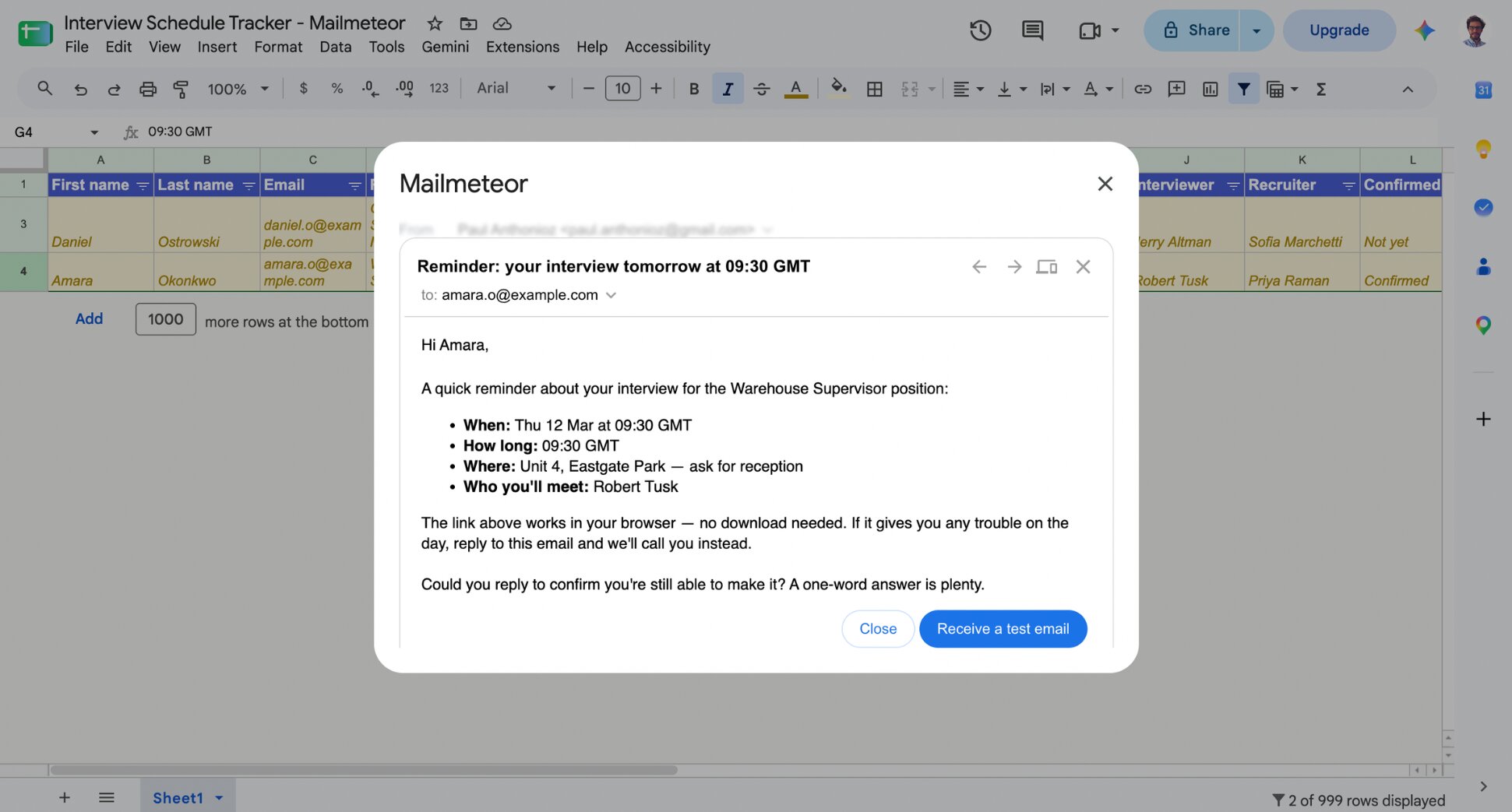
You’re checking more than one thing here:
- The time zone — If the candidate is in a different country, the time in your sheet is your time, and sending it without a zone is how people join an hour late.
- The link or address — Meeting links expire, get regenerated, or belong to a different interviewer than the one named in the email.
- Empty cells — A blank in any merge field is obvious to the candidate. Sort by each column and check for gaps before you send.
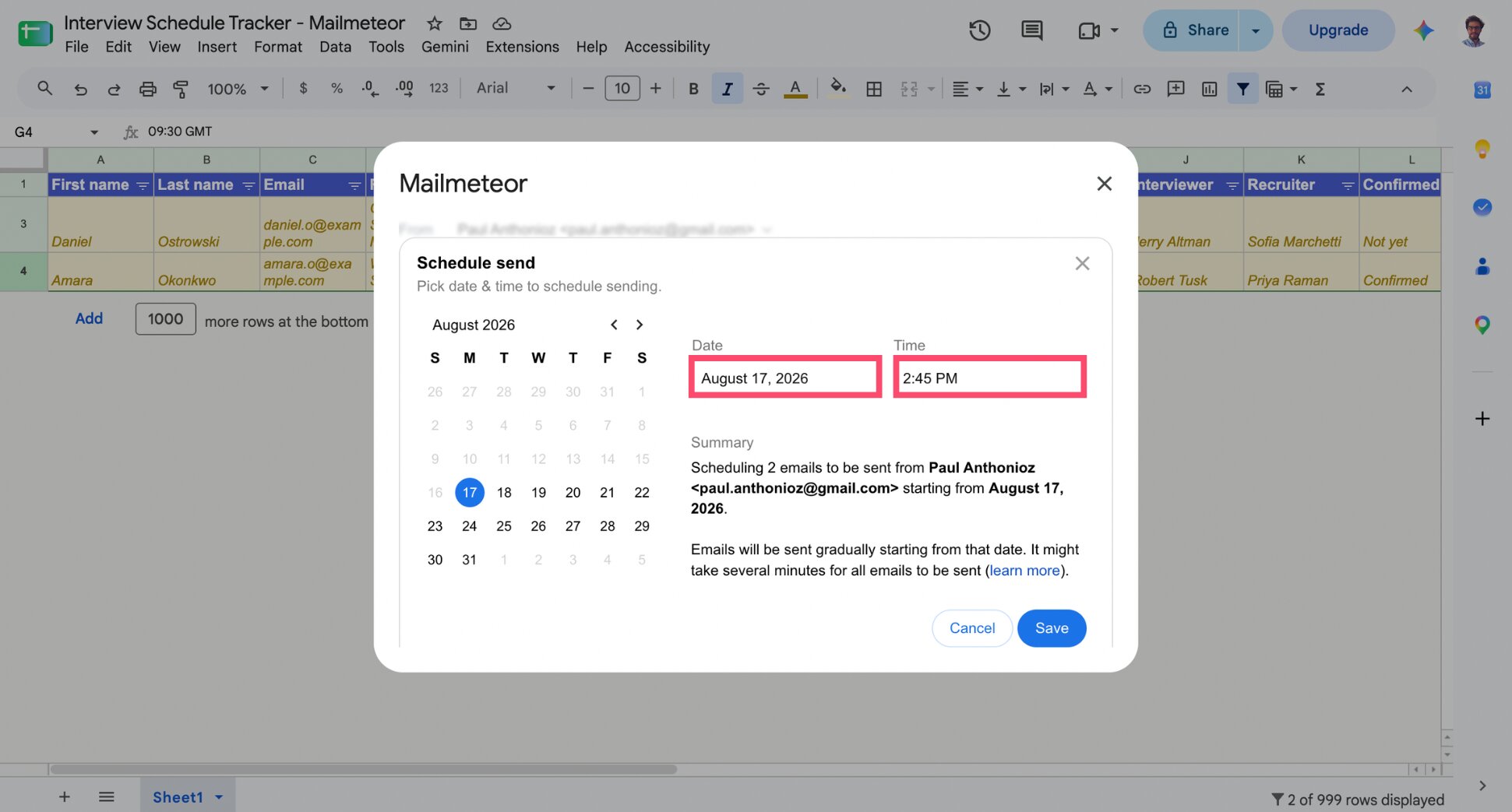
7. Schedule the Send
Click the arrow next to the Send button. Select Schedule send. Set the date to today and the time to mid-morning or early-afternoon. Confirm the schedule, and Mailmeteor sends the batch automatically at that time. Once replies start coming in, update your Confirmed column so you know who’s set for tomorrow.
Which Settings to Use for Interview Reminders
These settings decide whether a reminder actually helps or just adds noise. Get them right before your first send:
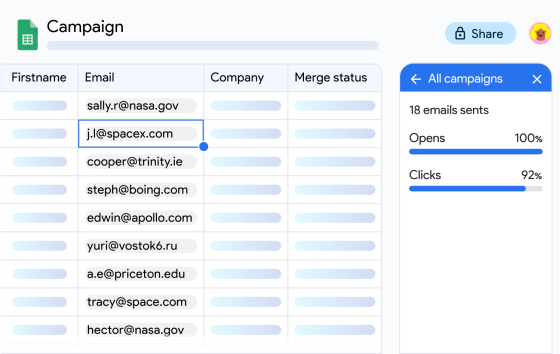
- Leave open tracking on — An unopened reminder 2 hours before the interview is a signal, and the response to that signal is to pick up the phone. Tracking is available on all Mailmeteor plans, including Free.
- Don’t set up automatic follow-ups — A reminder that chases itself is noise, and by the time a follow-up would fire the interview has already happened. If you have sequences configured elsewhere on your account, double-check none are attached to this campaign before you send.
Interview Reminder Email Templates
Here are 3 proven interview reminder email templates you can steal from us — merge tags included. Resist the urge to add more. The shorter these are, the more likely they get read in full before the interview starts.
Interview Reminder Email Template for a Video Interview
Hi {{ First name }},
A quick reminder about your interview for the {{ Role }} position:
When: {{ Interview date }} at {{ Interview time }}
How long: {{ Duration }}
Where: {{ Details }}
Who you’ll meet: {{ Interviewer }}
The link above works in your browser — no download needed. If it gives you any trouble on the day, reply to this email and we’ll call you instead.
Could you reply to confirm you’re still able to make it? A one-word answer is plenty.
See you tomorrow,
{{ Recruiter }}
Interview Reminder Email Template for an On-Site Interview
Hi {{ First name }},
Looking forward to meeting you tomorrow. Here are the details for your {{ Role }} interview:
When: {{ Interview date }} at {{ Interview time }}
How long: {{ Duration }}
Where: {{ Details }}
Who you’ll meet: {{ Interviewer }}
When you arrive, let reception know you’re here to see {{ Interviewer }} and they’ll bring you up. Please bring a photo ID.
Could you reply to confirm? And if anything’s changed, just say so — it’s easier to move the slot than to have you travel for nothing.
See you tomorrow,
{{ Recruiter }}
Same-Day Interview Reminder Email Template
Hi {{ First name }},
Quick reminder:
Your interview with {{ Interviewer }} is today at {{ Interview time }}.
Where: {{ Details }}
If anything’s come up, reply here and we’ll sort it out.
{{ Recruiter }}
Common Mistakes to Avoid When Sending Interview Reminders
Most interview reminder mistakes come down to bad data, not bad writing — a stale sheet, a dead link, or a detail that didn’t get updated. Here’s what to check before you hit send:
- The implied time zone — “2pm” means nothing to a candidate two countries away. Spell it out, every time.
- The dead meeting link — avoid regenerated links, links belonging to an interviewer who’s been swapped out, or links from a cancelled event.
- Reminding someone about an interview that was cancelled — this comes from sending off a stale sheet, the most common failure once reminders are automated.
- One email to the whole list — a single blast can’t carry candidate-specific details like time, link, or interviewer. A proper mail merge sends separate individual emails, each with the right details for that candidate.
- No reply path — a reminder from a no-reply address can’t do the one job that matters most, which is letting a candidate tell you they can’t make it.
- Too much content — company background, role responsibilities, and a link to your careers page all belong in a different email. This one is all about logistics.
What to Do When a Candidate Doesn’t Show Up
Give it ten minutes, then email once — the same day, briefly, without any edge to it. People miss interviews for real reasons and a sharp email closes a door you might want open. Here’s a template you can use:
Hi {{ First name }},
We had you down for {{ Interview time }} today and didn’t manage to connect. I hope everything’s alright.
If you’d still like to talk, reply here and we’ll find another slot. If you’ve decided to go a different way, that’s completely fine — just let me know so we can close things out.
{{ Recruiter }}
If they reply and want to reschedule, do it once. If you hear nothing after that, close them out properly with a rejection email rather than leaving them in limbo, or move them into your candidate pool if the fit was good and the timing wasn’t.
Wrapping Up
Interview reminders are the smallest possible piece of admin with the largest downside when skipped — an hour of your team’s time, a candidate’s day, and a slot that could have gone to someone else.
Mailmeteor handles the sending part:
📊 Every reminder sounds like you wrote it yourself — time, link, interviewer and duration, pulled per candidate from your own sheet.
👀 Nothing goes out wrong — preview catches the time zone mistake before the candidate does.
⏰ Tomorrow’s reminders, off your plate today — schedule the send and close the tab.
🔔 Know who’s actually going to show — tracking shows you who’s opened the reminder, so a silent inbox two hours before the interview is your cue to call.
Try Mailmeteor for free and send your first batch of interview reminders today — up to 50 personalized emails a day, no credit card required.
Not sure a mail merge tool is enough for your HR needs? See how Mailmeteor stacks up against the best outreach tools for recruiters.
FAQs
When should you send an interview reminder email?
24 hours before the interview is the standard. For early-morning slots, send it the previous afternoon rather than the evening. For interviews booked more than a week in advance, send two reminders. One at booking, one the day before.
Do interview reminder emails actually reduce no-shows?
They reliably prevent the no-shows caused by forgetting, time zone confusion and lost details. They don’t prevent the ones caused by a candidate accepting another offer or losing interest — though they often surface those a day early, which gets you the slot back.
How many interview reminders should I send?
One is enough for most interviews — sent 24 hours before. Add a second only if the interview was booked more than a week out (one at booking, one the day before) or if the candidate hasn’t confirmed by the day before. Beyond two, reminders start to feel like pressure rather than help.
Should you ask candidates to confirm their interview?
Yes. A confirmation request is what turns a reminder into information. You learn who’s coming, and the candidates who can’t make it tell you a day early instead of not arriving. Ask for a one-word reply so it’s easy to send.
How do you send interview reminders to several candidates at once?
Keep your interview schedule in a Google Sheet, filter it to tomorrow’s interviews, and run a mail merge so each candidate gets an individual email with their own time, link and interviewer merged in. Never send it as one group email — the details differ per person.
What do you do if a candidate misses an interview?
Email once, the same day, briefly and without reproach. Offer to reschedule. If you hear nothing back, close the loop with a proper rejection rather than leaving them without an answer.